Music Creator AI Review: All-in-One AI Music Generation Tool

Key Pointers:
Create Music Instantly: Just type what you want (like "happy pop song"), and the AI makes a full song for you in minutes.
Sing Without Singing: Use the AI to turn your voice into a professional singer or cover famous songs in your own style.
Remix Like a Pro: Easily separate vocals, drums, and bass from any song to create your own unique remixes.
Photo to Music: Upload a picture, and the AI will write lyrics and compose a song that matches the mood of your photo.
All-in-One Studio: You get everything you need—lyrics writer, music editor, and mastering tools—all in one simple app.
Table of Contents:
Introduction to Music Creator AI
What Makes Music Creator AI Stand Out?
Main Features of Music Creator AI
• AI Music Generator
• Turn Photo to Music
• AI Lyrics Generator
• Vocal Remover
• AI Stem Splitter
• AI Singing Voice Generator
• AI Song Cover Generator
• AI Music Mastering
• MIDI Editor
• AI Audio to MIDI
• Key & BPM Finder
• BPM TapperBenefits of Using Music Creator AI
How Music Creator AI Simplifies Professional Music Production
Music Creator AI is one of the most exciting and powerful tools in the world of AI music, AI music generation, and AI Songs, making it accessible to a wide range of users. This all-in-one platform helps professional musicians, content creators, podcasters, and hobbyists produce original music. It lets you generate lyrics, remove vocals, or create full songs with your own AI-generated voice. The platform has advanced AI music tools and an easy-to-use dashboard. It supports background music creation, music production, sound effects, and royalty-free music generation. This makes it a modern solution for creative audio work. Even without music theory skills or technical software, the platform allows you to create high-quality music by simply typing prompts or uploading files.
What Makes Music Creator AI Stand Out?
What makes Music Creator AI truly impressive is its wide range of features, allowing users to create background music, background tracks, or royalty-free music for videos, reels, and podcasts. The platform provides tools for audio mastering, creating MP4 lyrics videos, isolating vocals, generating AI songs, and working with music parts. These features make it perfect for content creators, musicians, and educators. The interface is simple and intuitive, so even beginners without music theory or music theory skills can create polished, professional-sounding tracks. You simply log in, provide inputs, and the AI generates complete music in minutes, turning complex music production into an effortless experience for everyone.
Main Features of Music Creator AI
1. AI Music Generator
The AI Music Generator is the core engine behind the platform and one of its most advanced Text-to-Music systems. You can describe the music you want to create using a prompt, select the genre, mood, instruments, ambience, and more, and the AI generates full tracks in minutes. Whether you want lo-fi background music, cinematic ambience, upbeat rap beats, EDM, R&B, blues, reggae, jazz, or instrumental-only tracks, this tool adapts to any music style. You can choose to generate AI Songs with vocals or an instrumental-only version, depending on your needs. It produces multiple variations, ensuring you can pick the version that matches your project’s mood and purpose.
How to Use the AI Music Generator
Click the AI Music Generator from the left menu.
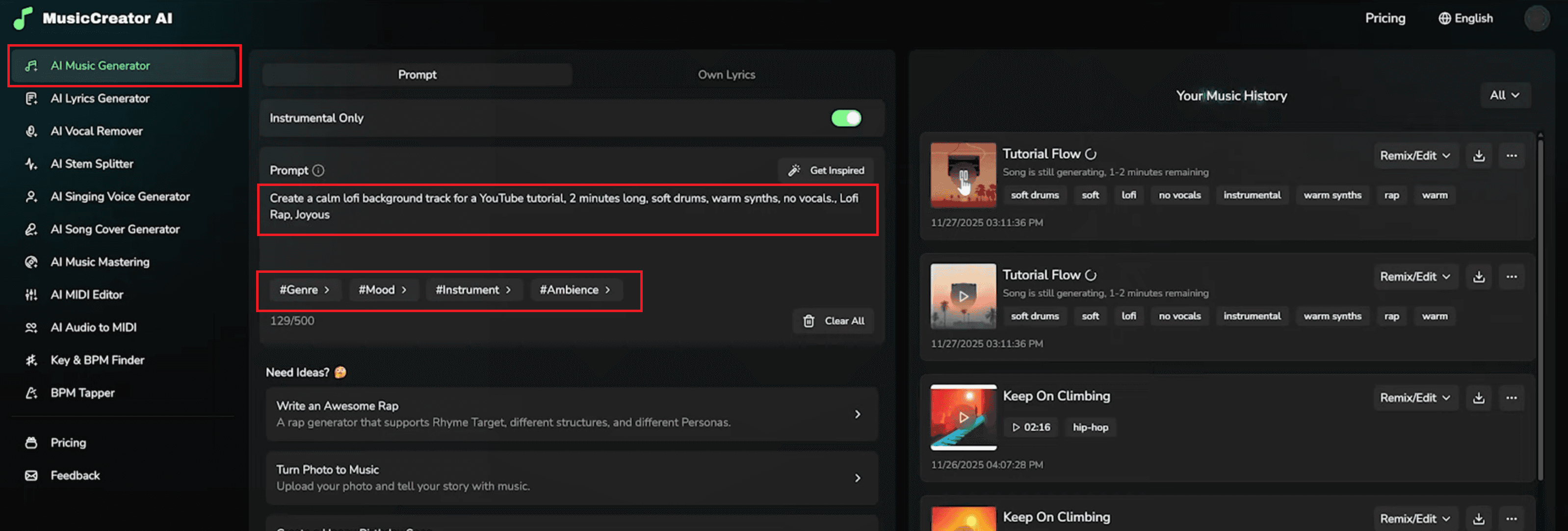
Choose Instrumental Only or Own Lyrics based on your project.
Type a detailed prompt describing the atmosphere, music style, instruments, mood, and the desired sound duration.
Select options under #Genre, #Mood, #Instrument, #Ambience, or #Vocal Gender.
Click Generate Music to create your track. text-to-music
Review the generated track under Your Music History and download or remix it.
2. Turn Photo to Music
This tool transforms your photo into music by analyzing the mood, colors, environment, and emotional elements shown in the image. It is like a desired sound duration engine combined with AI soundtrack technology. You can upload a photo—such as a vacation scene, portrait, or lifestyle image—and Music Creator AI creates lyrics, melodies, and a full song inspired by the photo. You can also adjust music style, mood, and instruments to personalize the result. This feature is excellent for content creators, vloggers, and storytelling enthusiasts who want unique audio for their posts.
How to Use Turn Photo to Music
Select Photo to Music from the menu.
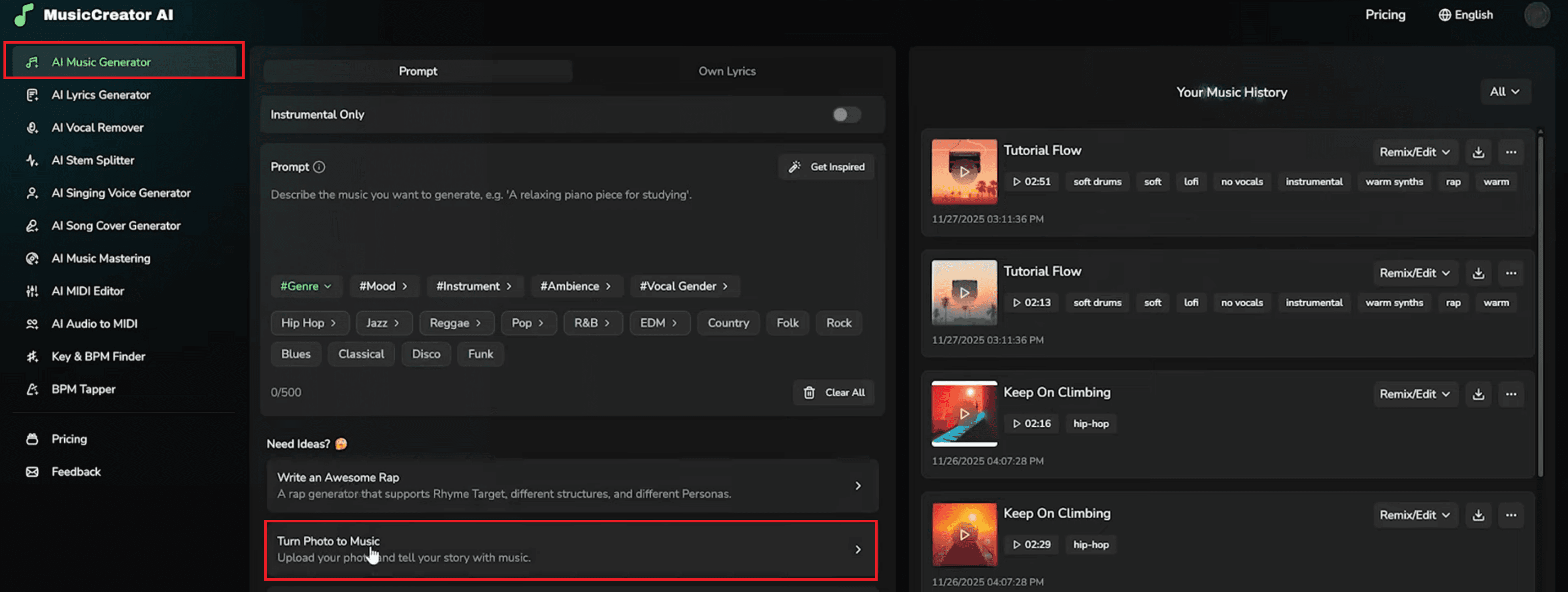
Upload your image (landscape, portrait, selfie, workspace, etc.).
Add optional text describing additional context or emotional direction.
Click Generate Photo Lyrics for the AI to create lyrics based on the image.
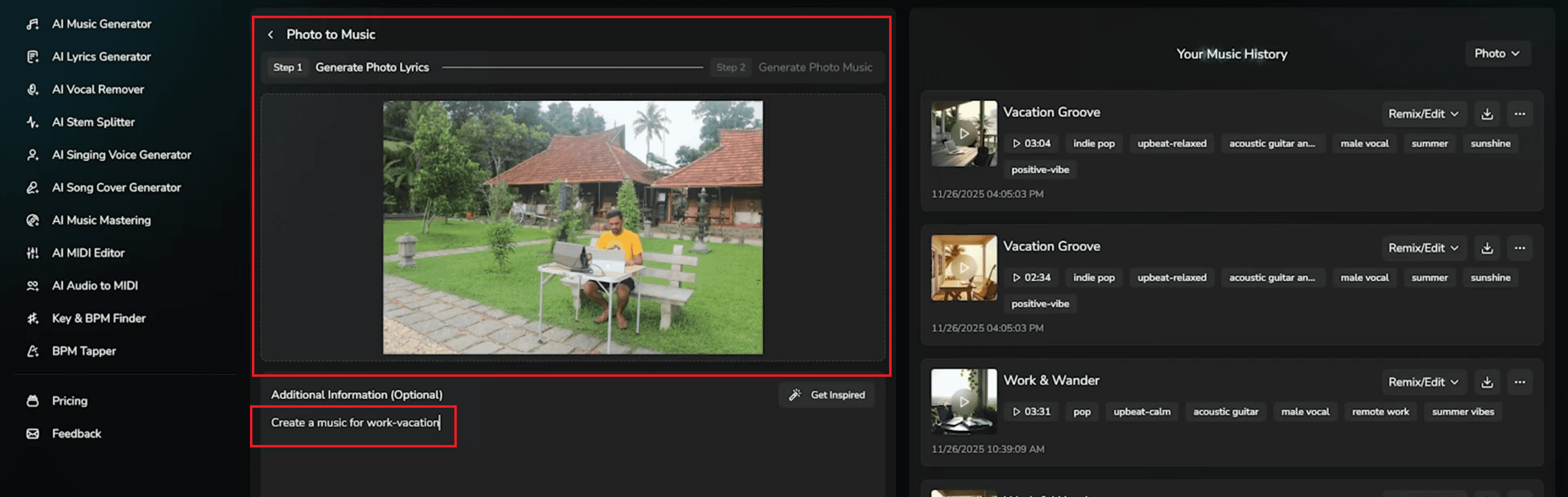
Proceed to generate photo music to turn lyrics into a full track.
Download, remix, or save your final AI soundtrack.
Also Read: Trupeer AI: Turn Raw Screen Recordings into Pro Videos
3. AI Lyrics Generator
The AI Lyrics Generator helps you write complete lyrics based on your story idea, theme, mood, and genre. Whether you want pop, hip-hop, rock, R&B, or EDM lyric styles, this tool creates structured verses, choruses, bridges, and hooks. You can choose mood categories such as energetic, romantic, sad, happy, or reflective. Once the lyrics are ready, you can instantly use them in the AI Music Generator to turn them into a full song.
How to Use the AI Lyrics Generator
Click the AI Lyrics Generator from the sidebar.
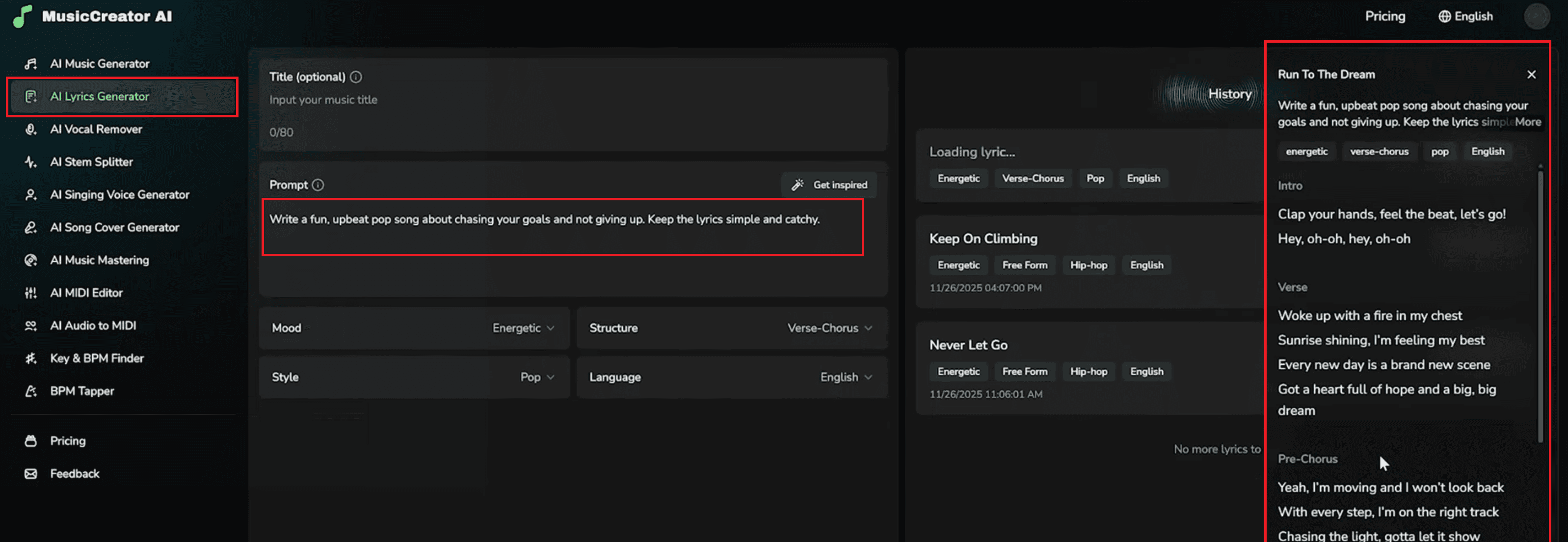
Enter a song title (optional) and then type a detailed prompt describing your theme, mood, or story idea.
Choose your preferred Mood, Style, Structure, and Language to shape the type of lyrics the AI will generate.
Click “Generate Lyrics” to produce a complete song, including verses, chorus, and other sections.
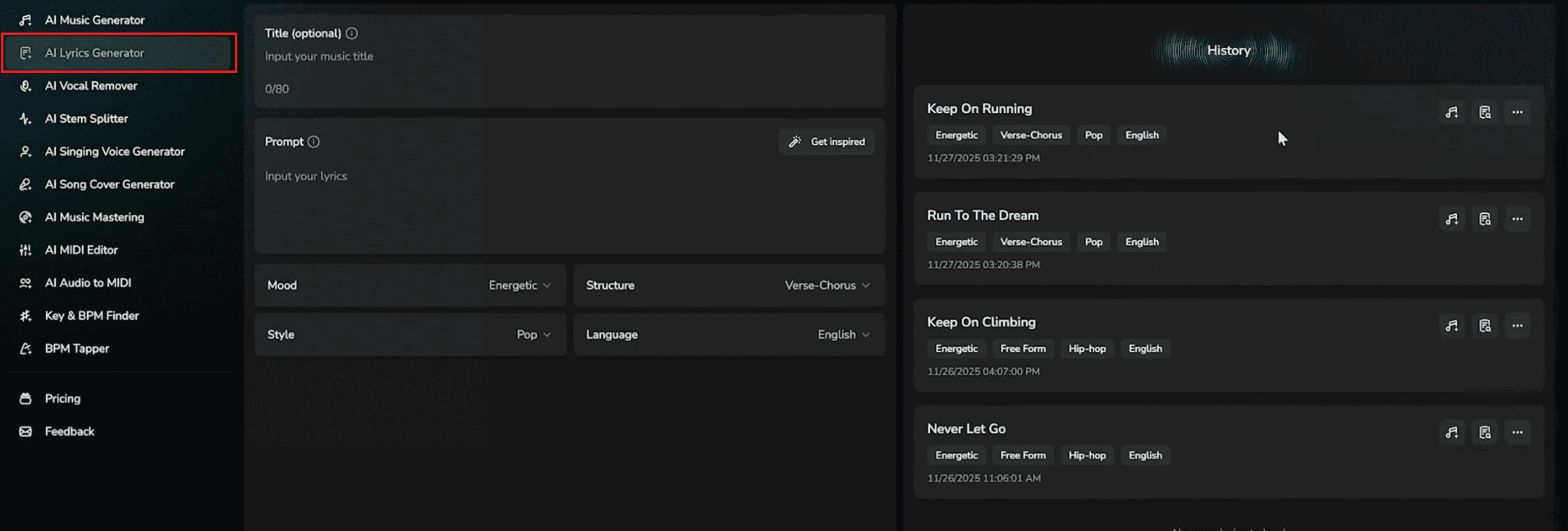
Review the generated lyrics, and if you're satisfied, send them directly to the AI Music Generator to turn them into a full AI-created song.
4. Vocal Remover
If you need an instrumental version of a track, the Vocal Remover is extremely helpful. This tool separates vocals from the instrumental parts of any uploaded song with impressive accuracy. After uploading your audio file, the AI quickly provides both the isolated vocals and the instrumental-only version. This is perfect for karaoke, remixes, covers, or using clean audio in your videos. It functions similarly to advanced AI vocal remover tools and is also great for creating sound effects, backing tracks, or practice versions for musicians.
How to Use the Vocal Remover
Click AI Vocal Remover from the sidebar.
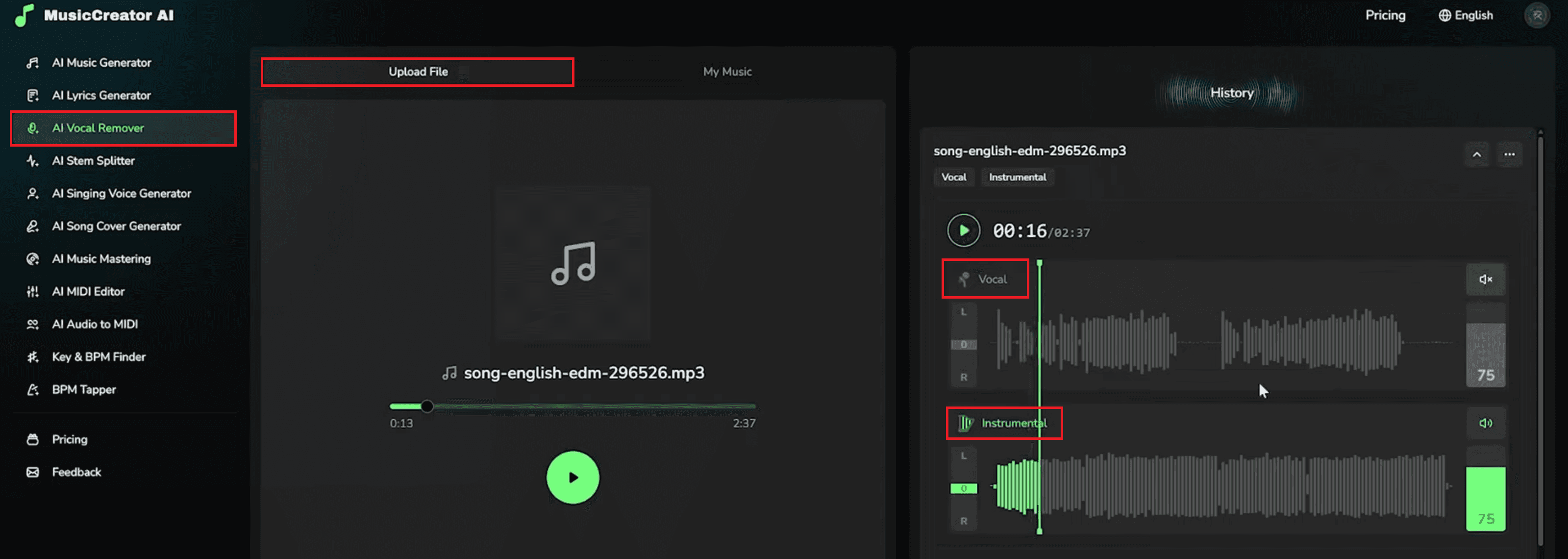
Upload your audio file (MP3, WAV, etc.).
Wait a few seconds for the AI to process the song.
Switch between Vocal and Instrumental tabs to preview separated audio.
Adjust volume sliders or mute/solo specific layers.
Download the isolated vocals or instrumental-only tracks.
5. AI Stem Splitter
In music production, “stems” are separate layers such as drums, bass, vocals, or instruments. The AI Stem Splitter analyzes a song and splits these layers into individual files for detailed editing. This is ideal for creators who want to split music or remix popular songs. It also helps those who study music composition by examining each musical component individually. You get access to key elements like drums, bass, vocals, and instruments with only one upload. This is especially useful for DJ mixing, music lessons, experimentation, and developing production skills.
How to Use the AI Stem Splitter
Click the "AI Stem Splitter" on the left panel.
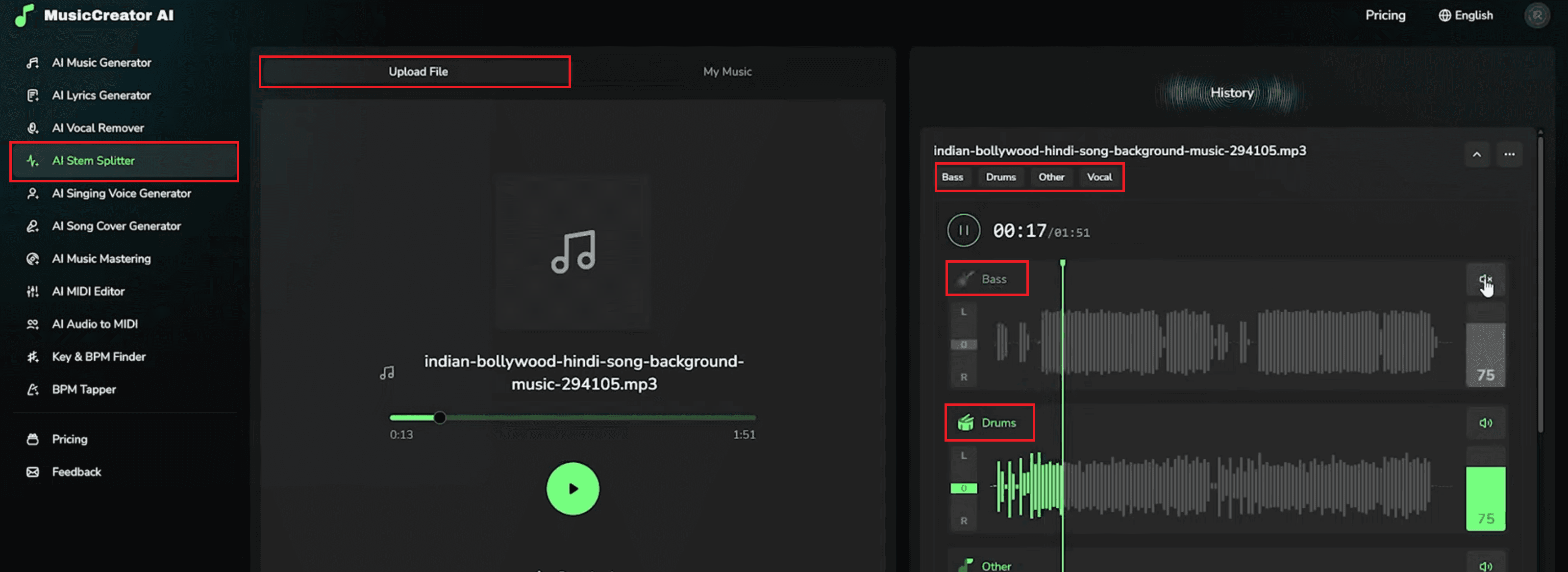
Upload your audio track (MP3, WAV, or another supported format).
Click “Separate Stems” to let the AI split the song into individual components.
After processing, preview the separated stems such as Bass, Drums, Vocals, and Other instrument layers.
Use the interface to mute, solo, or adjust the volume of each stem as needed.
Download the individual stems for remixing, production, DJ mixing, or learning purposes.
6. AI Singing Voice Generator
This impressive feature allows you to create full songs using your own voice, even if you’re not a trained singer. The tool lets you upload samples of your voice so the AI can build a custom vocal model using vocal synthesis technology. Once the model is trained, you can generate songs, melodies, or even reinterpret existing tracks in your own voice. It’s an exciting way to explore different music styles, try creative ideas, or experiment with a virtual version of your voice without needing a recording studio.
How to Use the AI Singing Voice Generator
Click the AI Singing Voice Generator from the left menu. (See screenshot)
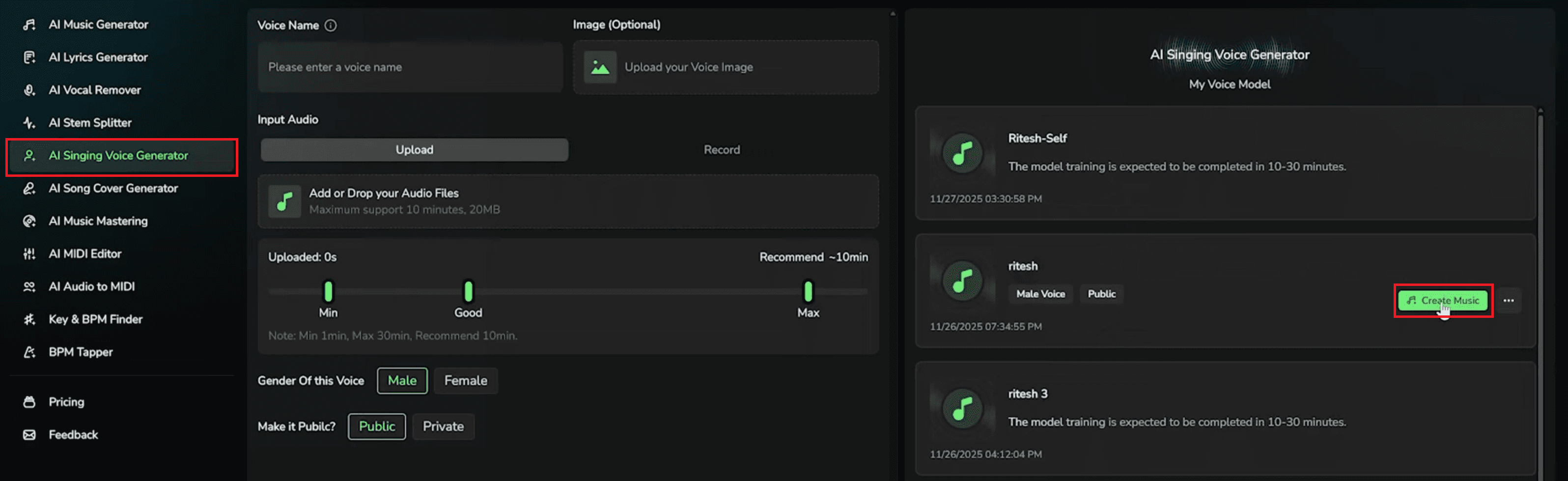
Name your voice model and upload your audio samples (1–10 minutes recommended).
Choose Male or Female for the voice gender.
Select whether your model is Public or Private.
Click Create Voice to begin training.
Once ready, click Create Music to make songs using your voice model.
7. AI Song Cover Generator
This feature builds on your trained voice model and lets you generate AI-powered covers of songs in your own voice. It’s a fun and interesting way to test how your voice would sound across different genres, tempos, and musical arrangements. Even skilled singers are often surprised by how accurately the AI captures tone, depth, and vocal personality. This makes it a valuable tool for creative exploration and expanding your musical style.
How to Use the AI Song Cover Generator
Click the "AI Song Cover Generator" from the menu.
From the available options, select your trained AI voice model that you want the cover to use.
Upload the original song (MP3, WAV, or supported file) that you want the AI to recreate using your voice model.
Choose the singer's gender setting — Male or Female — to match the intended vocal tone and performance style.
Click “Cover Your Music Now” to begin generating the AI-powered cover version.
Once the process is complete, download the final AI cover or remix/edit it further inside the platform.
8. AI Music Mastering
Mastering is the important final step of music production, making tracks sound polished and professional. Music Creator AI automates this process beautifully. You can upload any track and use Reference Audio to match its tone, loudness, and clarity. This helps YouTubers, podcasters, and musicians get good audio quality. They do not need to use expensive gear. The tool balances your track, increases quality, and ensures the final sound is ready for sharing or publishing.
How to Use AI Music Mastering
Click "AI Music Mastering" in the sidebar.
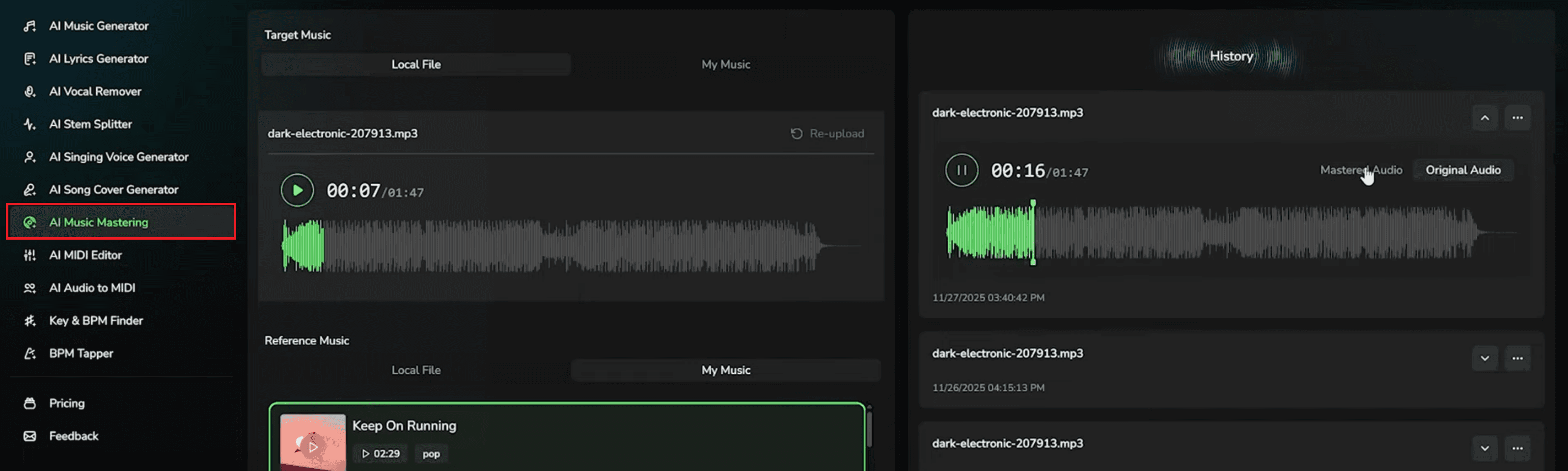
Upload your target audio file — this is the track you want to enhance and professionally polish.
(Optional) Upload a Reference Music file if you want the AI to match the tonal balance, loudness, and style of another song.
Wait a few moments and then preview both the Mastered Audio and the Original Audio to compare the difference in clarity, loudness, and depth.
Once you’re satisfied, download the mastered version for use in videos, music projects, or publishing.
9. MIDI Editor
Music Creator AI includes a powerful AI-backed MIDI Editor that lets you modify melodies and adjust musical ideas easily. It works alongside tools like the AI MIDI Generator, allowing both beginners and experienced musicians to experiment with notes, rhythms, chords, and overall structure. This hands-on approach helps users understand musical structures. It gives them flexibility to create or fine-tune melodies without needing advanced music theory knowledge.
How to Use the MIDI Editor
Click the AI MIDI Editor from the menu.
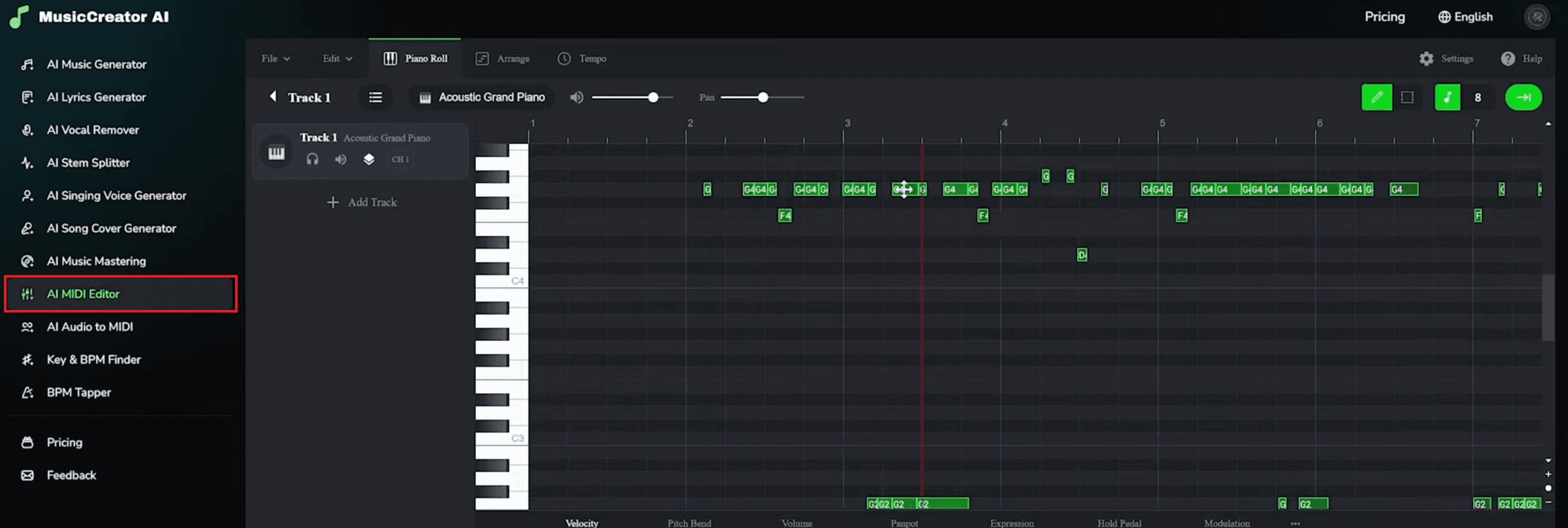
Upload or open a MIDI file (either your own or one generated by the AI Music Generator).
Inside the piano-roll interface, drag notes to change pitch, move them horizontally to adjust timing, or delete notes you don’t want.
Add new notes, tracks, or instruments to build harmonies, basslines, or melodies.
Fine-tune your performance by adjusting velocity, pitch bend, modulation, and expression controls.
When finished, export the edited MIDI file to use in your DAW or further refine in other Music Creator AI tools.
10. AI Audio to MIDI
This tool transforms audio recordings into editable MIDI files. Whether it’s a humming idea, a short melody, or a part of a song, the AI captures its structure and turns it into MIDI notes you can modify. This feature is great for remixing, learning compositions, and turning raw musical ideas into clear, playable music. It’s especially helpful for working with different music components, practicing arrangement skills, or building new tracks from simple ideas.
How to Use AI Audio to MIDI
Click “AI Audio to MIDI” from the left-side menu inside Music Creator AI.
Upload your audio source (such as humming, singing, an instrument recording, or part of a song).
The AI will process the file and automatically extract the melody, pitch, and timing into MIDI notes.
Once the conversion is complete, download the generated MIDI file.
(Optional) Open the MIDI file in the built-in MIDI Editor to edit notes, rearrange melodies, or adjust instruments.
11. Key & BPM Finder
When you upload any song, Music Creator AI instantly detects its key, alternate key, BPM (beats per minute), and energy level. This is very helpful for DJs syncing tracks for a smooth mix or for content creators who want music that perfectly matches transitions in MP4 videos, MP3 audios, or edited clips. The tool gives you precise information to help with timing and musical compatibility.
How to Use the Key & BPM Finder
Click “Key & BPM Finder” from the left-side menu in Music Creator AI.
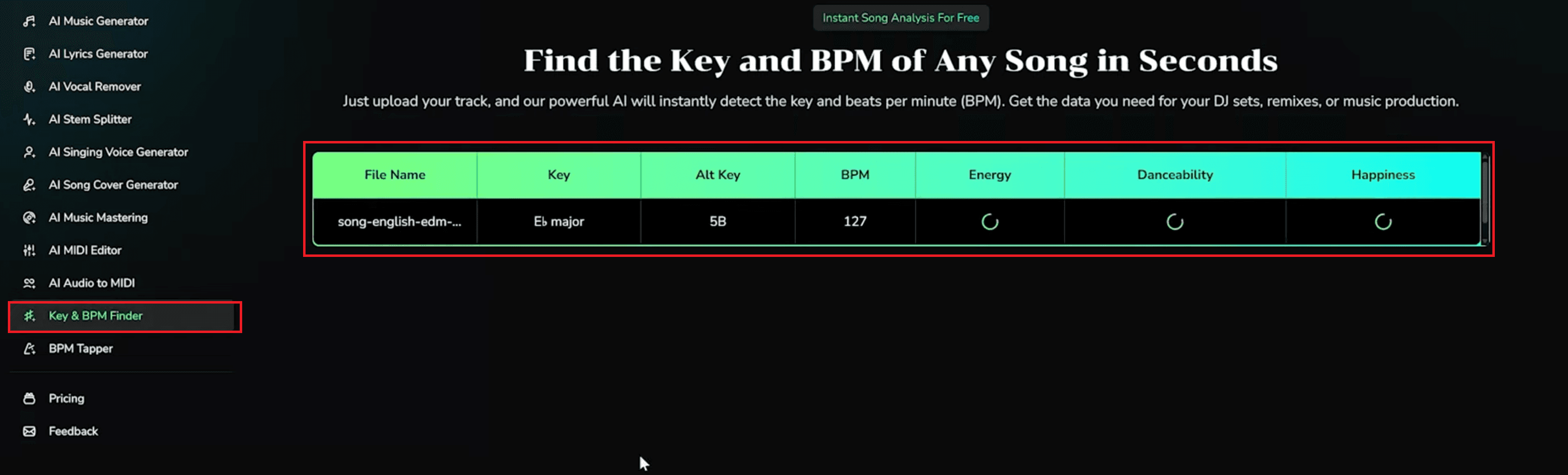
Upload your song file (MP3, WAV, or supported audio format).
Wait a few seconds while the AI analyzes the track.
View the detected values, including:
Key
Alternate Key
BPM (Beats Per Minute)
Energy Level
Danceability Score
Happiness / Mood Indicators (depending on the tool version)
Use the extracted musical data for mixing, beat-matching, transitions, or editing your project.
12. BPM Tapper
This simple but useful feature lets you tap along to music with your keyboard or mouse, and the AI will calculate the exact tempo. This is helpful when structuring edits, planning beat drops, or identifying sound duration and rhythmic patterns. It’s a fast way to understand tempo without relying on advanced tools, making it ideal for beginners and creators who need a quick reference.
How to Use the BPM Tapper
Click “BPM Tapper” from the left-side menu inside Music Creator AI.
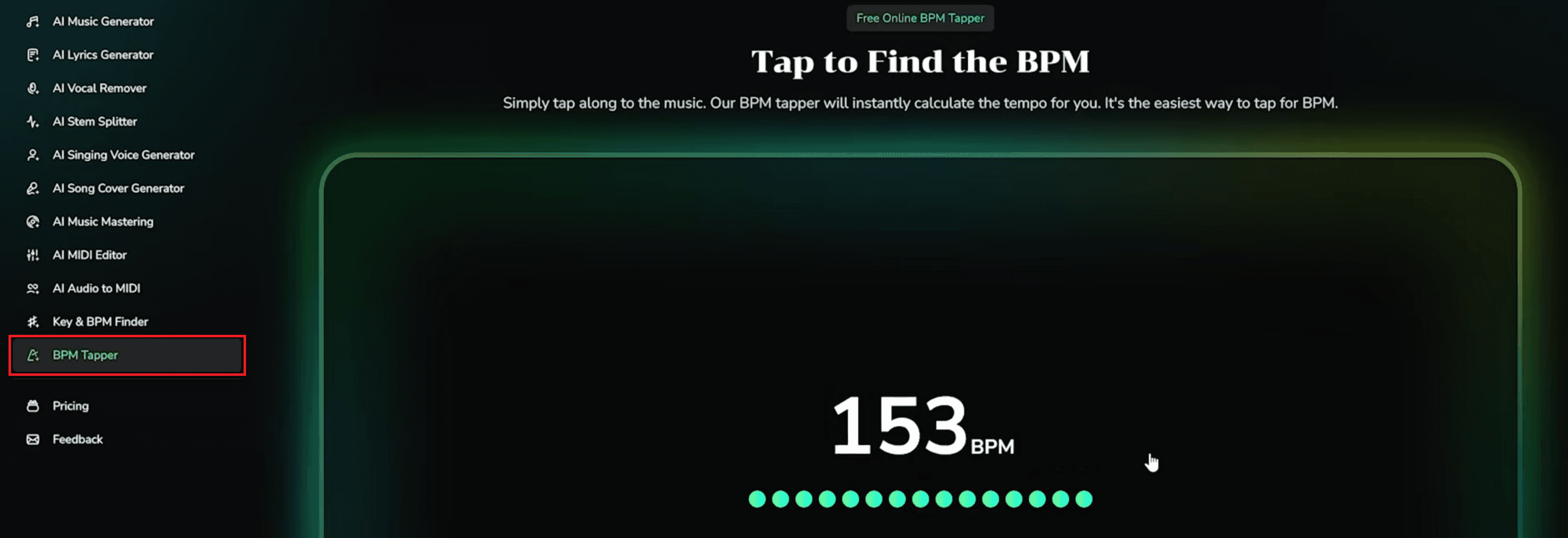
Start playing your music externally (from Spotify, YouTube, your PC, etc.).
Tap your keyboard (usually the spacebar) or click the on-screen tap button in rhythm with the beat.
The BPM will update live as you continue tapping.
Use the displayed BPM for mixing, beat matching, editing timing, or syncing music in your project.
Benefits of Using Music Creator AI
Easy to Use: Music Creator AI is designed for all skill levels, offering an intuitive interface that makes music creation simple even for complete beginners. You don’t need musical experience or technical knowledge to generate high-quality results. Every tool guides you smoothly through the process.
Multi-functional Platform: The platform combines music generation, editing, mastering, vocal removal, stem splitting, and voice creation all in one place. This eliminates the need to use multiple apps or software. Everything you need for music production is accessible from a single dashboard.
Time-Saving: AI automation helps you create full tracks, stems, lyrics, and mastered audio within minutes. The tool removes long manual steps that usually take hours in traditional production. This makes it perfect for creators working on tight schedules.
Affordable Creativity: You can produce professional-quality music without buying expensive software or studio equipment. The platform lowers the cost barrier for beginners, hobbyists, and small creators. It offers advanced features at a budget-friendly price.
Customizable Output: You can choose specific moods, genres, instruments, vocal types, and styles to shape your track exactly how you want. This flexibility allows you to tailor every piece of music to your project. The AI adapts to your creative direction easily.
Copyright-Free Content: All generated music is original and royalty-free, making it safe for commercial use in videos, reels, podcasts, and more. You won’t face copyright strikes or licensing issues. This ensures stress-free publishing on any platform.
How Music Creator AI Simplifies Professional Music Production
Music Creator AI transforms the entire music production process into an intuitive, enjoyable experience. If you need high-quality background music for a YouTube tutorial, you can get it here. You can remix a track using the AI Stem Splitter. You can create AI songs with your voice or make unique content using photo-to-music features. The platform handles all the hard work. You don’t need expensive software, music theory knowledge, or editing expertise. The tools are easy to use, powerful, and incredibly flexible—making Music Creator AI one of the most complete AI Music Tools available today. If you want a simple and creative way to make music, try Music Creator AI and experience how effortlessly technology can enhance your creative workflow.